Monday, 9 February 2015

Military Robotic Mech Modelling 5

As your saw in the last blog entry, there's been a bit of development in the modelling process. This blog will show the changes and changes made, as well as the next stages of development.

Several new pieces have been added/changed to add to the concept of the Robotic Mech. Some where for aesthetic reasons, whilst others were to try and continue the idea of realism in my work. The following list of changes/additions are listed and explained below. Note exploded views of each piece have been provided where possible to give you a good idea of the amount of pieces that go into each model:


Armour Plating:
I felt that the model was looking a little plain on the hull, so I decided to create a few modular armour pieces that could be easily placed  and give the RM a better armoured feel. This also made use of previously built modular parts, such as the bolt heads and bar frames, which has continued on the idea of modularity that I wanted to get in my model.


Lights:
These have been missing from the model for most of the building process, largely due to the fact they were easy and quick pieces to model. I created the new armoured light piece to add some variation to the hull's design and look.


Additional Cameras:
The purposes of the additional cameras are to provided the RM with additional visual information feeds, in which to take into account and use on the battlefield. Inspired by spherical secuirty cameras, they took a little time due to being unsure as to how I wanted the shape to work, but I'm happy with how this model turned out.


Side Armour:
At first I was unsure about giving this piece a high poly model, as I felt that it would lose the solid, flat look tat this armour usually has. However, through working out hard edge flow, I was able to make it work. The smaller pieces were a little more tedious, due to having to remove them and reconfigure them in order to make turbosmoothing easier in general.


Tank Hull:
The tank hull was a piece that got a lot of restructuring. The section for the second tank tread placement had been modelled wrong, in which I had to change it to a cavity instead on an inset square to get it looking right. Working out the hard edge flow took time as well, as some of the turbosmooth attempts ended up with a stretched look, which wouldn't have worked very well for when the textures would eventually be applied.


I wasn't entirely happy with the edge flow at this point, but I made changes that solved these issues, as I'll explain in the next blog update.

Tank Suspension:
The tank suspension was relatively easy, the main issue was to make sure that the connecting part to the tank wheels matched up correctly, adjusting its length as need to match it up as close as possible.


Ventilation Panels:

With a big tank comes the need for many ventalition panels, which were really easy to model. I additionally separated them from the hull model to again make the turbosmooth process easier, as well as making it easier to place them around the model as needed.


The next post will cover the optimisation process I went through with this Robotic Mech Model.

Wednesday, 4 February 2015

Military Robotic Mech Screenshots 2

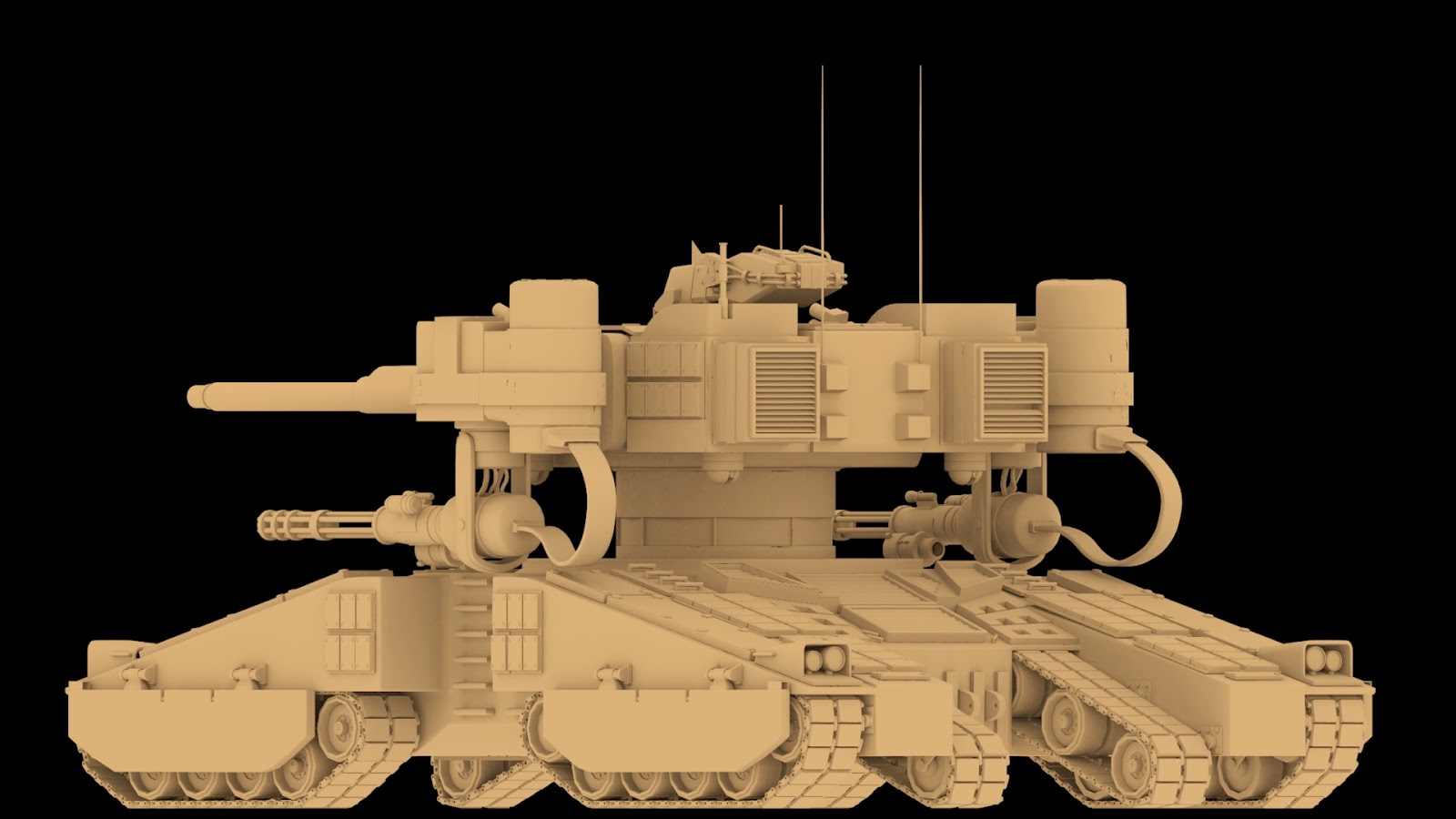
Brief update on the progression of the high poly Robotic Mech. A lot of progress has been made in the past few days, with pretty much all parts of the RM now modelled. There's still a lot of optimising to do, such as removal of unnecessary edges an checking for any modelling errors, but for the most part it is ready to be taken into the unwrapping.

Below shows you some screenshots of all the current parts put together in a separate 3DS Max scene (which is how I bow render out screenshots for the full model) with a simple skylight to provide lighting and one colour gradient applied, all of which is rendered out at an HDTV size of 1920 x 1080.

Since the last entry, there have been quite a few adjustments. As shown in the front view, the tanks hull has been widen, with more detail added on.

To bolster this new detail, turbosmoothing and new pieces, such as bolted panels, were used to give the robotic mech a stronger look.

A lot of the big pieces, such as the tank hull, have been split into smaller parts and reattached to the model, to deal with any problematic topology and turbosmoothing issues. 

Its been difficult placing all the components into their correct places, which has required the use of the snaps toggle being set to vertex combined with enable axis constraints. This has allowed for a higher accuracy when placing all the parts together.

This current model stands at 749, 976 polys, 1,509,609 tris, 1,508,043 edges, and 757, 457 verts. These numbers will be reduced through the optimisation process, and will be severely reduced for the lower poly version. 

The purpose of this RM variant would be to act as a MBT unit. Alternatively, it could be used for guerilla operations or for security purpose of high-tech facilities. 

It comes equipped with a main cannon, two machine gun ports, two smoke launchers, and two Gatling gun arm attachments. It has a total of 10 optic sensors, 4 on the head, 4 on the underside of the turret, and two on the Gatling guns themselves.  

It comes packed with heavy, thick layered armour, and several blocks of reactive armour to bolster its defensive. The front and back of the vehicle can also be equipped with obstacle clearing equipment, or spare gear/ammo containers for the tank itself.

Over the course of modelling this RM I have had to make a lot of changes and adjustments from the original design. This in part is due to the ongoing research of looking at real life military vehicles, but also I've found that parts of the concept didn't translate very well to the 3D side.

However I am very happy with how the model has progressed up to this point. Although I am behind my planned schedule, I am now more confident that I can at least deliver part of the original proposal I made, whilst making changes, keeping it fresh, and still being able to deliver a satisfying end product/artefact for this project.

The next update will cover how I developed the model to its current stage in depth.

Sunday, 1 February 2015

Military Robotic Mech Screenshots

This entry is a brief showcase of the robotic mech in its entirety so far. As I've done on previous posts, this will show the whole model from varying angles, to give you a visual update on my current work.


Seeing the whole model put together shows the eventually visual impact the robotic mech will have. Safe to say i'm happy with the overall look, although would've liked to have been further ahead at this point.

I've also made a few alterations to the tanks base, mainly through removing pieces that would have clashed with the robots arms, as well as the change in the head and initial arm design. This shows that a lot of my original concept hasn't panned out as first planned, and has need changing to make it work. I am however happy with most of the changes that done so far.

The next post will contain further modelling work on this Robotic Mech design.

Military Robotic Mech Modeling 4

Carrying on from the last entry, work production has started on the robots arms

For the first arm attachment, I decide to give the mech Gatling gun arms, to match up with the idea of it being a high powered MBT. (Main Battle Tank.) 

To begin with, I constructed a basic block out version of the arm based of the original concept, and placed it accordingly on the WIP model. 

Blockout arm on model. 

I then gathered a few reference images of Gatling guns, placed one within the scene, and started to build up the components. This stage was relatively easy, as the most of the pieces were cylindrical in nature, with a few extrusions here and there. At this point I was focused on the low poly pieces and getting the initial shapes right. 

Gatling Gun stage 1.


One piece I worked into a little at this stage was the optical gun sight, which gives an additional targeting system for the Mech to work with. I looked at a few different designs, and created two based off what I liked. I chose the design on the right as I felt it worked better with the general shapes being used for the Gatling gun. 

Gun scope designs. 

Once the initial shapes were done, I lined up the Gatling gun as close as possible to the block out, and started to create the other pieces needed for the the arm, including an ammo drum, wiring and the shoulder piece as shown below.

Gatling gun being placed.

Arm piece current piece.

Arm piece current progress shot 2.

Arm piece broken up.


I found that the arms have taken a little time, mainly due to working out the shapes of certain pieces, and what could be broken up to resolve topology issues and make the model easier to deal with. 

Low poly split up into individual pieces. 


My main focus at this point was to get the Gatling gun model, as I consider it a main part of this model. I proceeded by breaking the low poly into several pieces, working on each one individually, breaking up the model into simpler pieces and working out hard edges for the gradual transition to the high poly through using turbosmooth.  

Gatling gun high poly shot 1.

Gatling gun high poly shot 2.

I'm happy with the result so far, with the turbosmooth pieces working fairly well together when put into the desired shape. Below are a few example renders as it currently is. There are a few smoothing issues and parts that need adding, but overall I'm happy with how its worked out. 

The next entry will show the robotic mech's overall progression so far. 

Military Robotic Mech Modelling 3

This entry continues to show the ongoing modelling work that I have done. Since its been a little while since I last posted, I'll be splitting up the latest into a few easier to read bite size chunks.

Most work has been paid to achieving the correct look for the turret. Since its a large piece, I want to make sure it looks good and works well with the other components. Fleshing out the topology and placement of the high poly model has been particularly paramount. A lot of hard edge manipulation through using vertex snap with axis constraints and removing of some unneeded edges has been a particular focus for this piece. You can see a general progression flow of the turret below.

Tank Turret Progression. 

Additionally I noticed that the turret was a little too wide, so that had to be scaled in to make it feel less 'fat' as such. Trying to get the curve at the front of the turret, and the metal panel extrusion right were also pressing matters, but I feel that I've got them to a point that I'm happy with.

Other general pieces that have been worked on include:

The underside plate that connects the the turret to the torso part. This was originally attached to the turret, however I found that topology issues were frequent, so decided to separate it, thus making the topology easier to deal with with both parts.

Tank underside plate. 

The door panels for the ammo storage. These were pretty easy to model, and made use of part of my modular kit with the circular bolts.

Armoured door panels.


The shoulder piece on the left, which again required a little time working out what pieces could be removed from the main piece and re-attached on as separate parts. The armour plating was used again to cover up empty areas of detail on the turret, and the vent panel at the back gained additional topology through use of connecting adding vertices to edges and connecting them.

Left: Shoulder piece. Middle: Armour plating. Right: Vent panel.


The sloping panels at the back received little change, just a few topology additions for texture purposes. The shoulder panel gained some of the modular kit pieces with the circular bolts again.

Sloped pieces and shoulder part.

The Grenade Launcher received a major tune up. This was due to the fact I hadn't consider the circular shape of the front of the turret, thus making it hard to fit the flat surface of the original smoke launcher onto it. Thanks to a little internet reference I was able to create a new workable model, that instead attaches onto the side of the turret.

Smoke Grenade Launcher new version. 

The tank hatch, which at first I struggled to create, as I didn't quite understand the shape flow of the reference image I was using. I went through a few ideas, but couldn't quite get it to work. In the end, I made use of the viewport piece's base (which was also changed as I realised I had modeled the top part of it wrong), and changed it to suit the hatches needs, as you will see in the last image, along with the machine gun port and the connecting point for the tank's main gun.

Tank Hatch reference.

Tank hatch first iterations. 

Top left: final tank hatch. Bottom Left: Tank gun piece. Bottom Right: Machine gun port. Top Right: Viewport piece.

I also started to model the security cameras that would go on the underside of the turret, giving the robot additional robotic eyes in which to survey the battlefield with. However, I wasn't sure how to model it correctly, so its still currently in the basic stages.
Security Camera in the basic stage. 

At this point the majority of the tank turret was modeled. In fact, to see how it looked all put together, I mirrored the pieces, attached them all together, and also placed my test head on the turret, I was quite pleased with the initial test render, and also well the head has worked together with the tank turret.

Tank turret with Head. 

The next entry will cover work done on the robot mech's arm parts.

Saturday, 24 January 2015

Game Engine Testing and Scaling Issues

After having a discussion with my supervisor last week, I've realised that there are a few technical areas of my project that need to be considered, which I will talk about and show work that I have currently done for these issues.

The first of which is FPS (Frames Per Second), the optimum frame rate of which a scene can run at containing game assets, lighting, and so on. My latest model iteration stands at 354, 145 polys and 713, 422 tris. This is largely in part due to the tank treads, which I will be creating iterations off in order to reduce the poly count. Regardless, this would be too high for an in game asset, and be more appropriate for a cinematic cutscene instead.

Through doing a little research on the polycounts of vehicles in games today, I found that there a lot of factors to consider. Elements such as the console platform the game is being made for, the genre and the game engine used play a big part. So whilst there are games with lots of character that use vehicles, such as lost planet, with 30,000-40,000 for its robots, there are others like Forza 4 with a minimum of 400,000 to 1 million polys. These factors have an important part to play in a vehicles construction.

Article on Kotaku that talks about Forza Motorpsport 4's features, including the 400,00 to 1 million poly counts for its vehicles. 
So I've decided that I will continue to model the high poly model, texture it, and then create an optimised lower poly count version that could be used for in game. This will allow me to show off the model, but at the same time show off its practicality as well. In terms of a platform, this model would most like be for be used in a Xbox One or PS4 console title.

Also, Deciding on how it would function in game is important. For instance, a game with just robots fighting would allow for a higher poly, whereas if its a drive able vehicle in say a First person shooter would have to have a lower poly count, to make by for any other vehicles on characters poly counts in the same area.

In the meantime, I found that testing the frame issue was important. In 3ds max alone, panning around the model can make the FPS leap between 70-110 fps. For an optimum result, 60 FPS would be best for an in game model. There's some topology that could easily be scaled back to help with this issue, though this mainly affects the low poly model rather than the high poly model.

In order to test the FPS, I decided to implement  my current model into two game engines: UDK, and Unreal Engine 4.

My first test was in UDK. To begin with, I exported the entire model merged together as an FBX in 3DS MAX, and attempt to import it into UDK. However, my first attempt failed, as it turns out for a single asset UDK can only handle a maximum of 65, 535 faces or verts on a model. So I had to go back into Max, split up the pieces further, and re-import into UDK. This took a few attempts to get right.

Once in the standard UDK scene, I found a few issues. First, it was obvious that my scale was off. Since I've been working on the design currently by eye, I have yet to set a proper scale for the model, so this is something to be dealt with in the coming days. Also, certain parts came in with visible modelling issues, such as the tank tread pieces.

UDK import issues. 

Model distortion issues with the tank treads.

Working pieces in UDK, but with the wrong scale.

Correct scale, and looked pretty good, but the fps issues were a problem.

UDK full model 2.


However, I was able to place all the working pieces together and get an idea of how it would look. Unfortunately, the frame rate  was sticking to a constant 108-120 fps, which wouldn't work well for a in game scene. Safe to say, it was quite the hassle getting the model into UDK, and has made me realise it's not the best choice for my High-poly model.

In comparison, Unreal Engine 4 was far more successful. There were no issues when it came to importing the model, and I also discovered it automatically brings in textures attached to the model in the export, which saves time have to manually bring these in separately from the model. Although again the scale was off, it was easy to scale down. Also, UE 4 had no problems frame rate wise, easily running with my model in the scene at a steady 30fps. So when it comes to implementing the model in engine, I'll definitely be making use of Unreal Engine 4 for this task.

UE4 Screenshot 1.

UE4 Screenshot 2.


In regards to my earlier comment about the scale of my model, its become clear that clarifying this issue is paramount to my work. To begin with, if the scale is drastically off, i'll have to rescale each piece separately, and have to rest the x-forms, otherwise it will cause texture issues in the long run. Also, getting a correct sense of scale will make it clearer to the viewer exactly how big it is. So for the time being, I have modeled a basic ladder to give you a sense of scale, as ladders a good comparison object in relation to a human's height.

Tank model with the added ladder, which gives a better idea of its size. 

So as the post shows, its not just about making a pretty looking model, but one that functions as well as it looks. By having taken these aspects into consideration, I will be able to make much more efficient models for this project overall.

Further updates to come.